RPG Maker MZ
Series:
Genres:
Themes:
Perspectives:
Game Modes:
Description from Steam STEAM
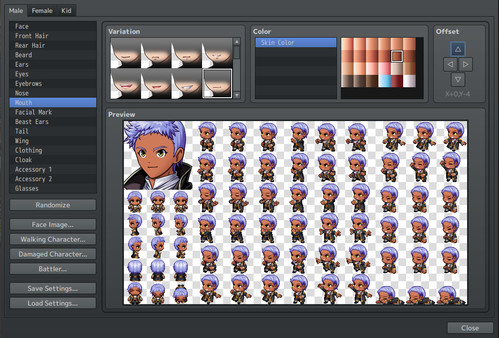
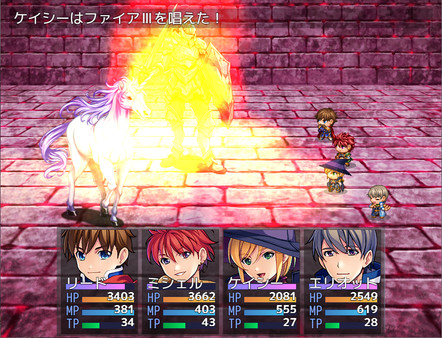
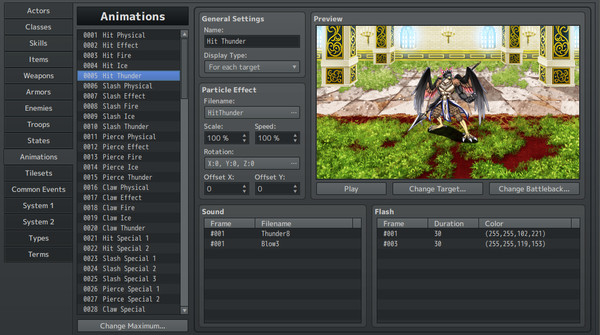
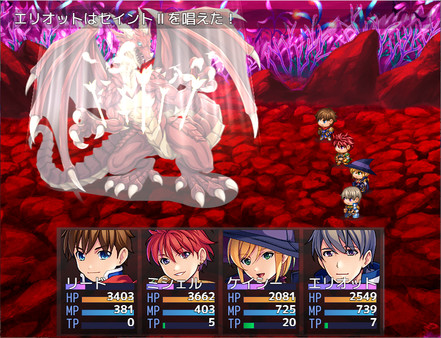
Sample Games Sample games made in MZ are available for FREE The project data for those samples are also available in the Workshop. Feel free to take inspiration and reuse any part that you like! Demo Game Demo game made in MZ are available for FREE By playing this game, you'll be amazed at what RPG Maker MZ can do. Feel free to give it a try and it just may inspire you to create your own games! What is RPG Maker? No programming knowledge required! If you love games, surely you've thought at least once, 'I wish I could make a game myself.' Programming, however, is a huge obstacle that stands in your way. Coming up against such a challenge, perhaps most people have given up due to the difficulty involved. That becomes quite a loss for the entire game industry, because from among the ideas discarded, there's bound to be creations that could lead to huge, earth-shattering hits. The RPG Maker series was created to answer the wishes of all kinds of people who have found themselves saying, 'I want to make a game without learning programming,' or 'Could anyone really make a game?' A Tool Designed to Make Games RPG Maker is known in Japan as 'RPG Tsukūru.' 'Tsukūru' is a coined term that, in a literal sense, combines the Japanese words for 'make' and 'tool.' This signifies that RPG Maker is a tool that is designed to make games. Within RPG Maker, we have already programmed the basic operations that support RPGs. Making an RPG is as easy as putting in the stats for your heroes and villains, drawing up some maps, and using a simple eventing system to drive the story to it's finale! Create an Original Game with Ease! Included with RPG Maker MZ, we have prepared a wealth of resources consisting of the visual art and music that are needed to make games. All you need to focus on is giving shape to your own ideas. On top of that, for anyone looking for something beyond the materials that are already provided, we have a vast collection of additional downloadable content intended for the RPG Maker series. By using these assets in combination with your ideas, you can unleash your creativity on the gaming world. About the Software The RPG Maker Series' Newest Offering: RPG Maker MZ With new features and enhancements to older features, this RPG Maker is set to become the best RPG Maker to date! Map Editor With RPG Maker's map editor, you can create maps with ease. Pick the tiles you want to use, and “paint” them on to your maps. With powerful enhancements from the previous RPG Maker’s map editor, and a large collection of new tiles, you can build countless towns and dungeons for your players to explore!. ●Tile size can be selected from '16x16', '24x24', '32x32', and '48x48'. The new tile resolution options facilitate the use of RPG Maker VX and VXAce tile sets (32x32) and custom assets. ● The Layer Function Returns! An incredibly missed feature from RPG Maker XP returns with MZ! Map layer control has returned. You can now select which of the four map layers you are drawing onto, or leave it on Automatic to keep the behavior from MV. This gives you more control to make your maps look the way you want to, as well as speeding up the map creation process: No more having to redo an entire tile because you messed up one layer or want to change the base layer! ●Shadow pen rectangle mode for wide-area manipulation Holding down the Shift key when selecting a shadow pen allows you to switch to rectangle mode, which manipulates a wide area. ● Map Trees can be Rearranged You can now rearrange the Maps in the editor Map Tree even on the same tree level, making it easier than ever to organize your project for maximum efficiency. Character Generator Not only can you use the included characters or import your own made completely from scratch, you can also create your own original characters using component pieces using the built in Character Generator! Combine hairs, eyes, clothes, accessories, and more. Recolor them to match your vision. ● Adjust Component Positioning You can now use the offset feature in the Character Generator to adjust the placement of generator pieces, giving you greater control over the look of your heroes, villains, and NPCs! ● Add New Color Palettes You can now go beyond the existing color palettes: add your own palettes for recoloring hair, clothes, and more! A Trove of Assets Included From face graphics, character sprites, to map chips, character generator components, music, and sound effects, and more, RPG Maker MZ boasts the largest collection of assets out of the box than any RPG Maker in the series history! ● Graphics Animations: 120 Battle Background 1: 51 Battle Background 2: 50 Character Sprites Sheets: 44 Character SV Battlers: 40 Face Graphic Sheets: 15 Character Busts: 120 Character Full Art: 120 Enemy Battlers: 105 Enemy SV Battlers: 105 Tileset Sheets: 31 Parallaxes: 21 Title Screens: 20 ● Sound BGM:48 BGS:29 ME:27 SE:345 ●Sample map data(dlc\RemakeMapResourcePackFolder) Sample map data of RPG Maker VXAce 117 Sample map data of RPG Maker MV 104 *See readme in the same folder for usage instructions Database The database is where the heart of your RPG Maker game resides. Here you store the information defining your characters, their skills, equipment, classes, but also their foes! Also in the database will be where you define many things about your game, like the names of stats, what conditions your characters can be afflicted with, battle animations, and more. ●Maximum number of major database entries can be changed to 9999 The maximum number of Actors,Classes, States, Skills, Items, Weapons, Armors, Enemies, Troops, and Common Events can now be set to 9999. This allows you to realize the game you want to create, such as a game with a wide variety of items. ●Copy and paste tileset settings Passage, Passage (4 dir), Ladder, Bush, Counter, Damage Floor, and Terrain Tag setting can now be copied and pasted to other tileset pages. This makes it easier to set up alternate tilesets. ● New Battle System Added! With RPG Maker MZ, in addition to the front and side-view options that existed in previous RPG Makers, we've added a brand new option! The Time Progress Battle System will unchain your game from traditional turns, allowing every character to act at their own speed based on their stats and conditions. Events The Event system covers all the many NPCs, treasure chests, puzzles and everything else your players will interact with in your game. Using a simple system of menus, you can create a complex series of events that will drive your game to its conclusion. All with no programming knowledge required! ● We have added an 'Quick Setting' feature that allows you to specify coordinates from the preview screen in the picture (image) settings. This makes setting up images simple and intuitive. ● We have added a 'Quick Access' that allows you to instantly access your favorite maps. This enables you to quickly find maps you frequently use. ● Switch to event mode to display the event list Selecting an event on the list will select the corresponding event on the map. You can also open the event editor directly from the list. ● More Powerful and Extensive Event Commands! Through the addition of elements including control characters for text displays, picture movement settings and status determination for buttons used during conditional branching, we've augmented and expanded event commands. ●Toggle Skip' to disable a specified range of event command With the execution selected, [Skip] is created by using the shortcut key Ctrl+/ or the context menu [Toggle Skip] operation. This is useful when searching for the cause of a bug or testing the direction, since the event commands contained in [Skip] to [End] are not executed. ● Preview Added for Movement Route Settings! When setting up events, now you can check movement routes using a preview. Animation ●Particle animation with enhanced 3D expression With RPG Maker MZ, our Animations function has been completely revamped. Easily create huge fireballs, dynamic sword slashes, or freezing winds for your characters to unleash… and suffer. Due to popular demand, we have now included support for particle effects using Effekseer*, an open source particle effect creation tool! With this new feature, you can create magnificent 2D and 3D animations without having to use clunky spritesheets, making it infinitely easier to make extremely dynamic battle animations! ●RPG Maker MV compatible animation editing function Cell animations prior to RPG Maker MZ can be set by selecting [Create MV-Compatible data] from the animation context menu. Plugins Sometimes, you want to go beyond what is easy to do with eventing alone. That is when Plugins come in! Plugins are bits of code that can change almost anything in your RPG Maker game. Learn to code enough to make some yourself, or find ones made by others to bolster your game. Adding an existing plugin can be as easy as plugging it in! ● Revamped Plug-in Commands It's now possible to select a plug-in name and command name from a pull-down menu rather than having to enter it from text. Additionally, you can easily pass parameters to the Plugin Command requires with a simple menu system. ● Plugin Management Made Even Easier Turn Plugins On/Off from the base Plugin Manager Screen, Easily find the plugin creator's website with the new URL field in the Edit Screen, and be sure that your plugins have all the requirements and are in the correct order with the new error messages. Playing a Game RPG Maker MZ makes it much easier for users to play games! ● Auto-save Function Added Auto-save and separate auto-save slots have been added to the default functionality of the Engine! This option can be turned on and off in the Editor for your game. ● Better UI For Mouse and Touchscreeens The UI has been completely revamped to more comfortable and more intuitive for mouse and touchscreen control! Other updated features ● Sub folder asset organization Subfolders created under audio, img, and plugins can now be referenced from the editor. This is a useful feature for material management. *Some plugins may behave differently when stored in a subfolder
Description from IGDB IGDB
Basic Info
Additional Information
Платформы 2
Genres 2
Themes 1
Player Perspectives 2
Game Modes 1
Developers
Gotcha Gotcha Games
No description available
Kadokawa Games
No description available
Yoji Ojima
No description available
Publishers
Degica Games
No description available
Keywords